
Japa, a calm prayer and mantra counter.
A quiet place for the words you return to. Keep your practice text in view and count at your own pace, on iPhone, iPad and Apple Watch.
Get Japa on the App StoreUnlimited counting. No account. No ads. No subscription.
See the app in actionTry a round here. This demo resets when you reload.
Make room for a daily practice. Get Japa on your phone.
From your first round to a daily rhythm
A small place for your practice.
Choose your words, count a round, and pick up again when you are ready. These are real screens from Japa.
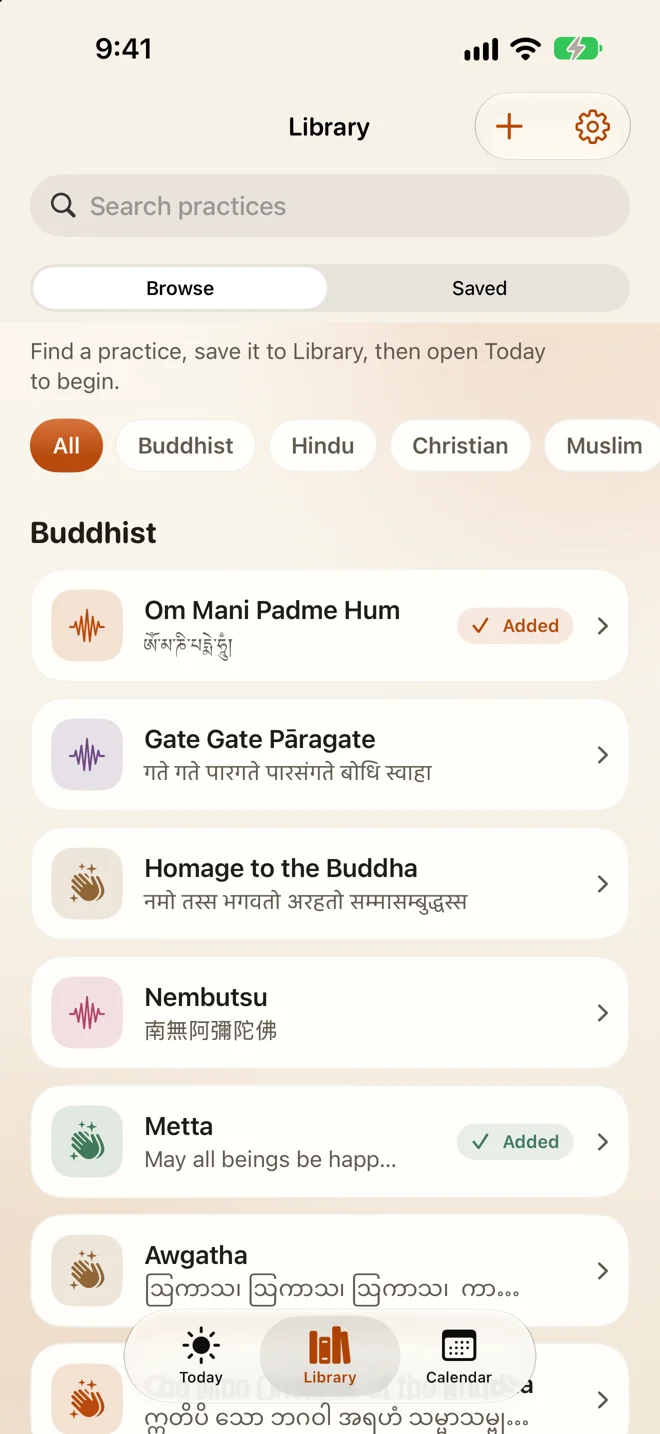
1. Find your words
Choose from the collection or write your own.
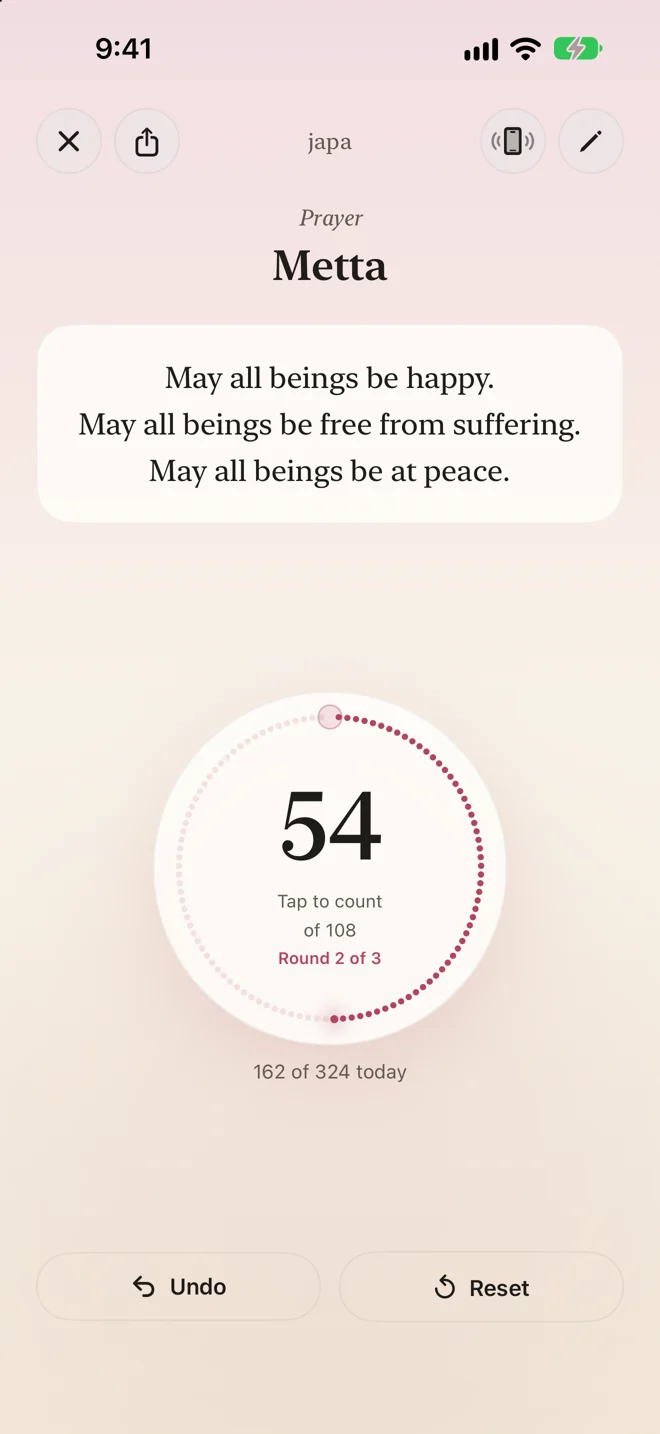
2. Count a round
Keep the text in view, with a haptic for each tap.
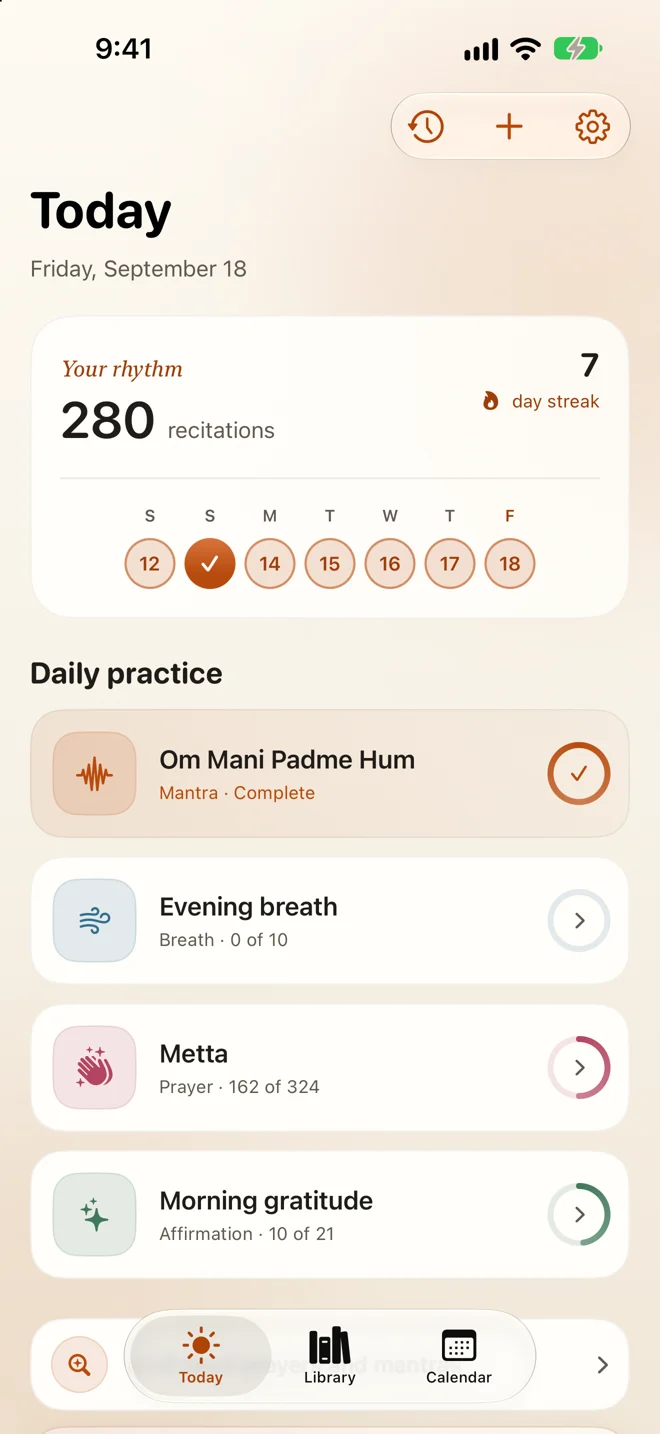
3. Return in your own time
See today’s practices and a gentle record of returning.
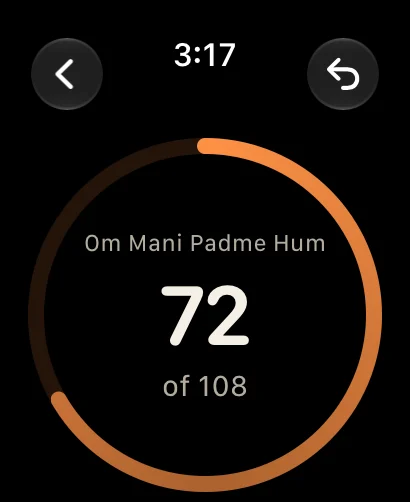
Free on Apple Watch, too
One less reason to reach for your phone.
Tap or turn the Digital Crown. Your watch keeps counting when your iPhone is out of range.
Explore Japa on Apple Watch →Every path is welcome here
Japa belongs to no single tradition. Its collection keeps Buddhist, Hindu, Christian, Muslim, Jewish, Sikh and secular practices side by side, each in the script its tradition writes it in, with a romanisation so you can say the words either way.
-
ཨོཾ་མ་ཎི་པདྨེ་ཧཱུྃ།
Oṃ maṇi padme hūṃ
The mantra of Avalokiteśvara, on a mala of 108.
-
سُبْحَانَ ٱللَّٰهِ
Subḥān Allāh
Glory be to God, on a tasbih of 33.
-
Lord Jesus Christ, Son of God, have mercy on me, a sinner.
The Jesus Prayer, on a prayer rope of 50 knots.
-
南無阿彌陀佛
Namu Amida Butsu
The Nembutsu of Pure Land Buddhism, on a mala of 108.
-
ਵਾਹਿਗੁਰੂ
Vāhigurū
Simran of the Sikh tradition, on a mala of 108.
-
Just this breath. Just this step. Just this moment.
Or no beads at all: a phrase of your own and a number that suits it.
What Japa does
One thing, carefully: it keeps the count, so you can keep your attention on the words.
- Tap to count
- A large dial you can find without looking down, a haptic for every bead, and your words on the screen above it.
- Count in rounds
- Choose the mala you count on (27, 33, 50, 54, 99, 108 or any size) and how many rounds make your day. An optional bell marks each round, even with the ringer off.
- Start from the collection, or write your own
- Traditional prayers, mantras and phrases in their own script. Whatever you write stays exactly as you wrote it.
- Breathe, in a tab of its own
- Five paced rhythms or one you write, and a sitting of a minute, ten breaths or as long as you like. A haptic and a soft tone mark each turn of the breath.
- Keep the holy days
- Navaratri, Ramadan, Lent, Vesak and more bring their practices to Today at their traditional counts, for as long as they run. Every one says whose reckoning its dates follow.
- Know what the words say
- Every text in the collection has a page: what its words mean phrase by phrase, where they come from, and whether a count is traditional or simply our suggestion. Read aloud wherever iOS has a real voice for it.
- Count without keeping it
- A quick count that opens at zero and saves nothing, for a round you don’t need recorded.
- Count from your wrist
- An Apple Watch app with its own haptics and a complication, free for everyone. It keeps counting with the phone out of range.
- Count from the Home Screen
- Widgets with a button that counts without opening the app, a Live Activity on the Lock Screen and Siri. Or turn on the volume buttons and count from a pocket.
- Carry it between devices
- The same practices and history on your iPhone and iPad, through your own private iCloud, if you choose.
- Hand a practice to someone
- Send a practice as a link and it arrives whole, words and count together. The words travel inside the link itself, so they never reach a server of ours.
A gentle intention, never a requirement
A daily goal in Japa is something to move toward, not a debt. Nothing nags you, nothing is lost when you miss a day, and resetting today never touches the days behind it.
The streak is there if it helps you, and quietly ignorable if it does not.
Japa collects nothing at all.
No account, no sign-in, no ads, no analytics. Your practices and their words live on your device, and in your own private iCloud if you turn sync on. You can export all of it to a readable file whenever you like.
In thirty-three languages
Chosen inside the app rather than from iOS, which is how Japa can speak Tibetan and Lao when iOS itself does not.
- English
- हिन्दी
- नेपाली
- ਪੰਜਾਬੀ
- தமிழ்
- ไทย
- မြန်မာ
- සිංහල
- ខ្មែរ
- ລາວ
- བོད་སྐད་
- Tiếng Việt
- Bahasa Indonesia
- Bahasa Melayu
- 简体中文
- 繁體中文
- 日本語
- 한국어
- العربية
- فارسی
- اردو
- עברית
- Türkçe
- Ελληνικά
- Русский
- Українська
- Polski
- Deutsch
- Français
- Italiano
- Română
- Español
- Português (Brasil)
Free to count with, for good
There is no cap on recitations and no timer. One purchase, if you want more room, and never a subscription. Japa Lifetime is US$6.99 on the US store, and priced for the region elsewhere.
Free
Everything you need to practise every day.
- Unlimited counting on iPhone, iPad and Apple Watch
- Goals, rounds, the bell and a daily reminder
- The built-in collection of traditional texts
- Quick count and the paced breath
- Streaks, themes and every language
- Exporting your data
- Up to three saved practices, and the last seven days
Japa Lifetime
A single purchase, shared with your family. US$6.99, once.
- As many saved practices as you like
- Your whole history, every month and all-time totals
- A breakdown by practice
- Custom breathing rhythms
- Holy days and seasonal programmes
- iCloud sync between your devices
Questions
Where is my practice data stored?
On your device. Japa has no account and no server of its own, and nothing you write is ever sent to us. If you turn on iCloud sync (part of Japa Lifetime, and off unless you turn it on) that same data is also kept in your own private iCloud, so your other devices carry it; it goes to Apple under your Apple Account and to nobody else. The only other thing Japa talks to is the App Store, and only if you buy Japa Lifetime.
What is free, and what does Japa Lifetime add?
Counting is always free and never limited, on iPhone and on Apple Watch: there is no cap on recitations and no timer. Goals, the practice text, the daily reminder, counting in rounds, the bell, the quick count, the paced breath, the built-in collection of traditional texts, the watch app and its complication, exporting your data, streaks, themes and every language are free too.
Free practice keeps up to three saved practices and shows the last seven days. Japa Lifetime is a single purchase (US$6.99 on the US store, priced for the region elsewhere) that saves as many practices as you like, opens your whole history (every month, your all-time totals and a breakdown by practice), adds custom breathing rhythms and observance programmes, and lets you turn on iCloud sync, so the same practices and the same history follow you to your other devices. Existing users keep their previous free allowance. It is not a subscription.
Can I count something without saving it?
Yes. Tap Quick count at the top of Today. It opens at zero, counts exactly like a saved practice (the dial, the haptics, the rounds and the bell) and keeps nothing when you close it. Choose the mala it counts in (108 unless you change it, any size you type, or none at all) and it remembers that for next time. Nothing it counts reaches your history or your totals. If you would rather not see the card, turn Quick count off in Settings.
I cannot hear the bell.
Check that Bell is on in Settings: turning it on strikes the bell once, so you can hear straight away that it works. The bell plays whether or not the Ring/Silent switch is set to silent, and it mixes with music or a podcast rather than interrupting it. If you still hear nothing, raise the volume with the side buttons while Japa is open.
I bought Japa Lifetime. How do I get it back on a new device?
Open Settings inside Japa and tap Restore Purchases, signed in with the same Apple Account you bought it with. Japa Lifetime supports Family Sharing, so people you share purchases with get it too. Your saved practices are separate: they live on each device unless you turn on iCloud sync, and they come across in an iPhone or iPad backup either way.
Will my practices sync between devices?
Yes, if you turn on iCloud sync in Settings. It is part of Japa Lifetime and stays off until you switch it on. Every device signed into the same Apple Account then shows the same practices and the same history, kept in your own private iCloud rather than on any server of ours. With sync off, each device keeps its own library. Either way your data is included in an iPhone or iPad backup, so it survives moving to a new device.
I reset today’s count by accident. Is my history gone?
No. Resetting only clears today; every earlier day stays exactly as it was.
How do I set a daily goal?
Choose the mala you actually count on (27, 33, 50, 54, 99 or 108, or Custom for a string of any other size) and how many rounds you want in a day. Rounds can be typed as well as nudged. The goal is what the two come to, so five rounds of 108 is a goal of 540 without you working it out. For a practice that is not counted on beads, choose No mala: that brings back the plain goal, where you can pick 9, 21, 54 or 108 or type any number up to 10,000.
How do I change the language or appearance?
In Settings, inside the app. Japa is available in thirty-three languages, chosen from a picker inside the app rather than from iOS, and can follow the system appearance or be pinned to light or dark.
Does Japa work with VoiceOver?
Yes. The counter, the day summary and the library are all labelled for VoiceOver, and Japa supports Dynamic Type and Reduce Motion throughout.
How do I delete everything?
Deleting a practice removes it and its history and, with iCloud sync on, from your other devices too. Deleting the app removes everything Japa has stored on the device; the iCloud copy, if you made one, is deleted in iOS Settings under your Apple Account’s iCloud storage, like any app’s.
Write to us
Questions, bug reports and requests are all welcome, and every email gets a reply. It helps to include your iOS version and what you were doing when something went wrong.